
THE ATELIER JOURNAL
Malfoid AI: Make a Female Malfoy Portrait from Your Photo
Malfoid is an internet nickname for a fan-made female interpretation of Draco Malfoy. Malfoid AI refers here to creating images or videos inspired by that look: platinum hair, a poised expression and fantasy-academy styling. On FemaleMalfoy.com, you can restyle your own photo with an original template, then animate the portrait. Registration is free; generation requires paid credits.
What does Malfoid mean, and is it the same as Female Malfoy?
Malfoid, Female Malfoy and Fem Draco are related names for a gender-swapped fan interpretation. They describe a character idea rather than one official image, casting announcement or AI model. A drawing tagged Malfoid may be human-made; the name alone does not tell you how an image was created.
Know Your Meme documents the nickname in the female Draco Malfoy fan-art trend. It also explains that the word combines Malfoy with a derogatory slang term for women. This guide uses Malfoid to explain the search term; Female Malfoy is the site's product name.
How to make a Malfoid AI portrait from your photo
Start with a single-person photo you have permission to use. The studio uses it as the identity reference while the selected template supplies the hair, wardrobe, setting and rendering style. You do not need to find the original meme image or install a character model.
- Sign in and buy a one-time credit pack. Generation unlocks after payment is confirmed.
- Upload a clear JPG, PNG or WebP photo, up to 24 MB, with at least 256 pixels on its shorter side.
- Choose a portrait template, image model, aspect ratio and number of outputs. Review the full credit estimate before submitting.
- Generate and inspect the result. Download your favorite portrait, or choose Bring it to life to create a separately priced video.
Create a Malfoid-inspired AI portrait →See the detailed photo preparation guide →
Which styles work for a Malfoid-inspired look?
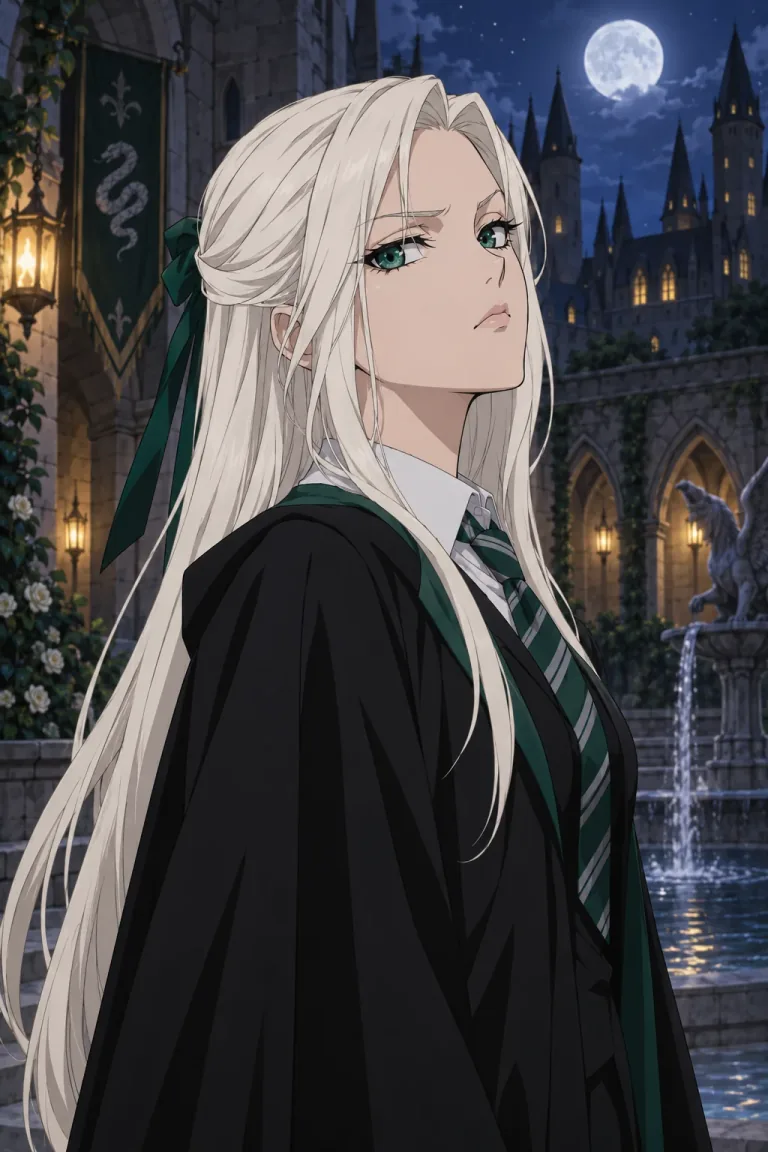
For an illustrated interpretation, Anime Rival uses linework and cel shading with platinum hair and a proud expression. High-Angle Crossed Arms emphasizes the pose: the subject looks up toward the camera with folded arms. Choose the visual medium first, then a pose or setting that fits your idea.
Silver & Emerald offers a cinematic portrait, while Watercolor Magic uses paper texture and translucent washes. The collection also includes gothic, editorial and storybook directions. These are original style previews, not copies of a particular artist's fan image. Our prompts use unbranded fantasy styling and avoid franchise crests, named houses and actor likenesses.
How do I make a Malfoid AI video?
Once a portrait is ready, choose Bring it to life to reuse that saved image as the video's reference frame. You can also upload your own portrait directly. Select Enchanted portrait for subtle head and hair movement, Moonlit corridor for a cinematic camera request, or Living storybook for illustrated motion.
Choose the supported duration, resolution and framing for your video model. Optional instructions can describe a gentle turn or camera push-in. Start with a small movement if keeping the face recognizable matters most. The templates request identity preservation, but the model can still alter details between frames. They do not include a licensed soundtrack or reproduce a specific viral clip.
What does Malfoid AI generation cost?
On this site, a portrait uses 1–5 credits per output depending on the image model and resolution. A four-image batch costs four times the selected per-image price. Choosing a different template adds no separate style fee. One-time packs start at $9 for 50 credits, and purchased credits do not expire.
Animating a portrait is a separate task with a separate video charge. The model, duration and resolution determine that total, which appears before generation. Failed provider tasks automatically return their reserved credits; a technically successful result you dislike is not automatically a failed task. Delivered credit-pack payments and failed-task credit returns are covered separately in the Refund Policy.
Compare credit packs and model costs →Read the credit return and refund rules →
Do I need a Malfoid LoRA or a custom image prompt?
No. This studio supplies its own portrait templates and model settings. It does not offer a Malfoid-specific LoRA download or require you to install one. The image template supplies the prompt; optional custom instructions are available for video motion. If you are looking for a downloadable character model, this photo workflow serves a different purpose.
Will the generated image look like me?
Templates ask the model to retain your facial features, skin tone and apparent age, but likeness is not guaranteed. Use an evenly lit photo with a visible face. Anime and watercolor styles simplify details more than a photographic style, so compare the rendering direction as well as the expression. Uploaded photos and generated results are private account assets; the public examples are original previews.
Is Malfoid AI free or an official Harry Potter tool?
You can browse the guides and style previews and register for free. Creating portraits or videos requires a paid credit-pack purchase. FemaleMalfoy.com is an independent fan-inspired tool, not an official franchise product. A realistic AI image is not evidence of a new character, actor or film announcement.
Choose the portrait before adding motion
For your first Malfoid AI creation, choose one clear source photo and the style that matches your intended medium. Review the still portrait before paying to animate it: a video starts from that image, so an unclear face or unwanted style will also shape the clip. The studio shows both tasks' prices before you begin.
Sources and editorial notes
The linked references describe the fan trend. Product instructions and prices on this page describe our current product and price catalog; they are not independent performance claims.